
PDF Editor

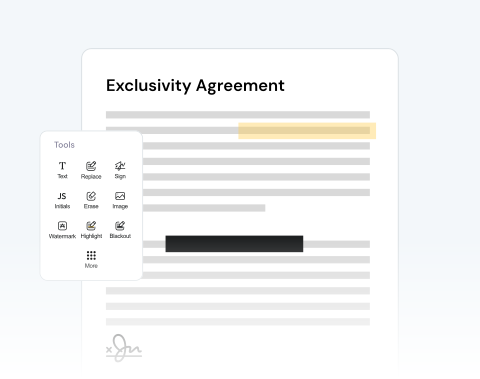
Edit PDFs in seconds with our secure online tool. Easily add and highlight text, annotate, and upload images.

Choose your File

or drag and drop

SSL Encryption - Supports PDF up to 100 MB and other formats and extensions up to 25 MB

Excellent 4.6 out of 5

Using our PDF editor, quickly make critical or helpful changes, such as:

  • Fill out forms and add signatures to contracts in seconds.
  • Highlight key concepts, add sticky notes to lecture slides, and annotate readings.
  • Correct a typo or update a price in your file instantly.

Find out how to modify a PDF online below and optimize your productivity.

How to Edit a PDF File in 4 Steps With Our Tool

Use our online tool to make any changes you like to your document in these easy steps:

1

Open your doc

Drag and drop your PDF or use the "Upload" button.

2

Use our edition features

Import images, add a signature, draw directly on the PDF, and more.

3

Convert your PDF

Change the format of your file to Word, JPG, etc, if necessary.

4

Save and share

Once you're happy with the document, download it and/or share it.

Edit PDF Files With MergedPDF to Avoid Mistakes and Increase Your Productivity

Annotate & comment on PDFs online

Highlight important terms in contracts or add study notes to your documents with our platform, which allows you to review and mark up documents instantly from any online device.

Effortless PDF editing to correct errors

Noticed a typo or mistake in your document? Upload your file in seconds and make corrections to a resume, update pricing on an invoice, modify dates, and more.

Add pictures and text to your document

Need to add an image? Or, want to include more text? You can easily insert company logos into reports, tack on new text fields, or circle critical details with our drawing features.

Optimize your document review process

You can share your PDF with others so that they can also add comments. This is very useful if you’re working with other contributors. Share directly from our site to speed up the process.

Make changes to files from any browser

Our platform is optimized for all major browsers, including Chrome, Safari, Firefox, and Edge. Simply make sure you have reliable access on any operating system.

Your trusted and secure PDF editor

Our mission is to provide the best PDF editor available. Our tool is reliable, secure, and produces the best results. We pride ourselves on customer satisfaction and make sure your files remain private.

MergedPDF Offers Multiple PDF Solutions

Start by creating a free account and make it easy to edit, convert, compress, and split your files!

  • Edit, convert, merge, and more with our platform
  • Get unlimited edits and downloads
  • Convert in multiple formats
  • 100% private and secure uploads and editing
  • 24/7 customer support

Frequently Asked Questions About Our Online PDF Editor

Everything you need to know about editing documents.

What is a PDF editor?
A PDF editor is a platform that allows you to make changes directly to a PDF.

Unlike Word documents and other formats, you can't make many changes to a PDF without some sort of platform or program.

In the past, you had to install software to edit PDFs. Now, you can do it online.

At MergedPDF, we provide PDF editing tools that are designed to be user-friendly and make everything quick and simple.
Do I need to install any software or extensions to use the PDF editor?
No installations are needed to use MergedPDF, as it’s a cloud-based tool that works directly in all major web browsers, like Chrome and Firefox. All you need to get started is a basic internet connection.

It's also possible to modify your PDFs on Windows, macOS, Linux, or mobile devices without taking up disk space.
Is it safe to upload my documents to MergedPDF?
Yes, it is safe to upload your documents to MergedPDF. We prioritize your privacy by using SSL encryption for all file transfers.

You also have the option to permanently delete your documents from our servers after processing to guarantee that your sensitive information remains confidential.
What features are available in the online PDF editor?
You can make changes to your file in many different ways using our tools, including:

• Add or edit text
• Add and adjust images
• Annotate and leave comments
• Highlight, strike through, or underline content
• Use the free drawing feature to draw directly on the PDF
• Sign the document
Can I edit a specific page on the PDF?
Yes, you can modify any of the pages that you like. With our tool, you can make any changes you like, whether it’s on just one page, a selection of pages, or on every page.

We give you the freedom to change your PDF however you want.
How do I add drawings to a PDF?
If you have the drawing saved on your computer or device as an image file, like a JPEG or PNG, you can use the image button on our editor to import the picture to your project.

You can then place it where you want on the PDF.

Alternatively, you can use the free draw tool to make your drawing directly on the PDF using your mouse or touch screen.

Once your drawing has been added, you can rotate, resize, and make other changes.
Will editing my PDF reduce the original file quality?
No, modifying your PDF will not reduce its quality. Our online tool is designed to keep the original resolution and formatting of your document. Add text or images, or make other changes, and your PDF will maintain its professional quality after the export.
Can I convert my PDF to another format after editing it?
Yes, with MergedPDF, once you finish making changes to your document, our tool lets you download it as a PDF or convert it to other popular formats, such as Word, JPG, or PNG, in just one click.

A Variety of Tools Beyond PDF Editor